
Omnichannel Inbox
The inbox is where the work happens. Every conversation — WhatsApp, Messenger, Instagram, Telegram, WeChat, SMS and email — lands in one queue that the whole team works from.
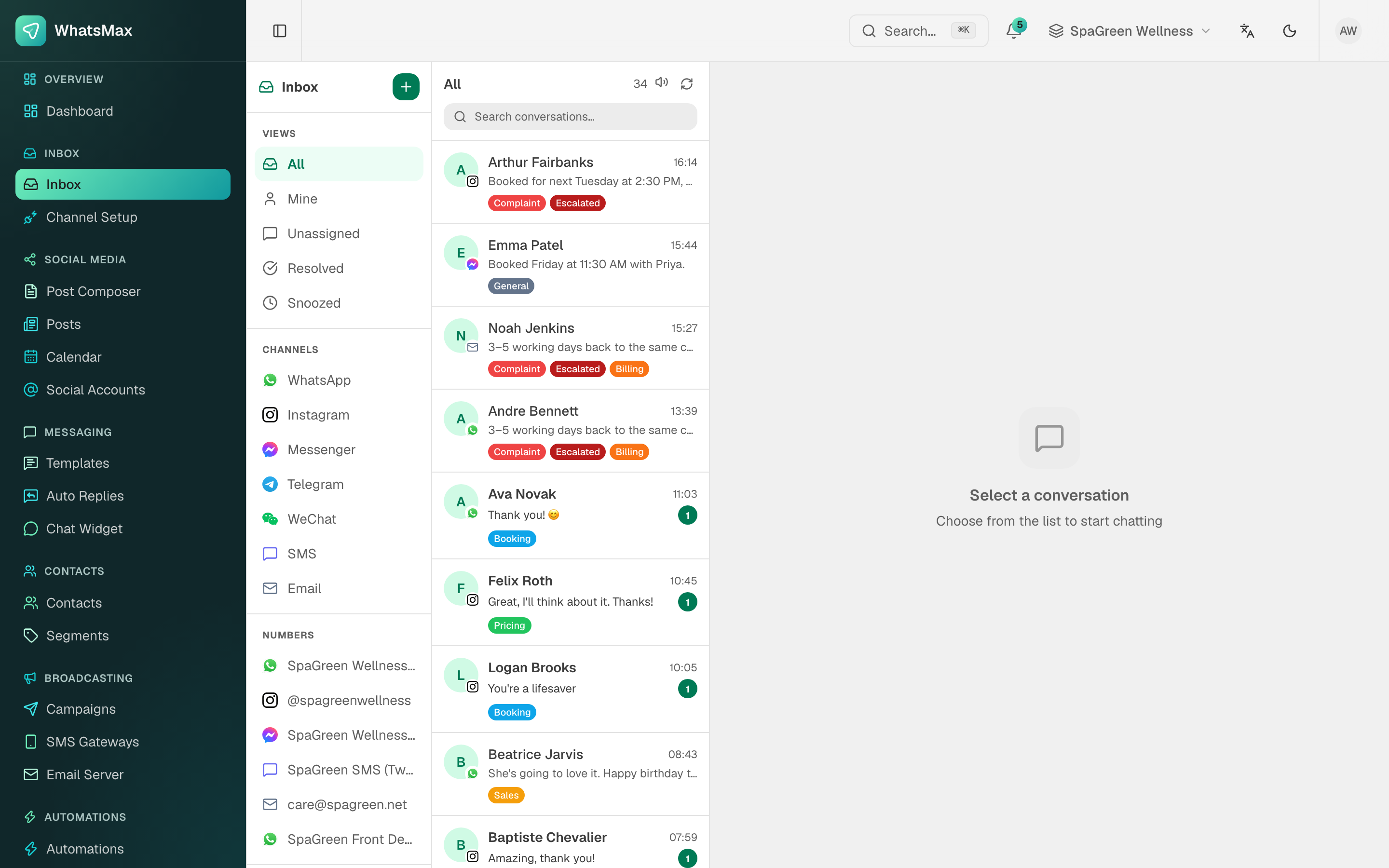 Views and channels on the left, the queue in the middle, the conversation on the right.
Finding the right conversation
The left rail is all filtering:
| Views | |
|---|---|
| All | Everything open in the workspace. |
| Mine | Assigned to you. |
| Unassigned | Nobody has picked it up — the queue that needs watching. |
| Resolved | Closed threads, still searchable. |
| Snoozed | Hidden until their wake-up time. |
Below that, Channels filters by network and Numbers filters by the specific connected number, page or mailbox — useful when one workspace runs several brands. Free-text search covers contact names and message content.
Working a conversation
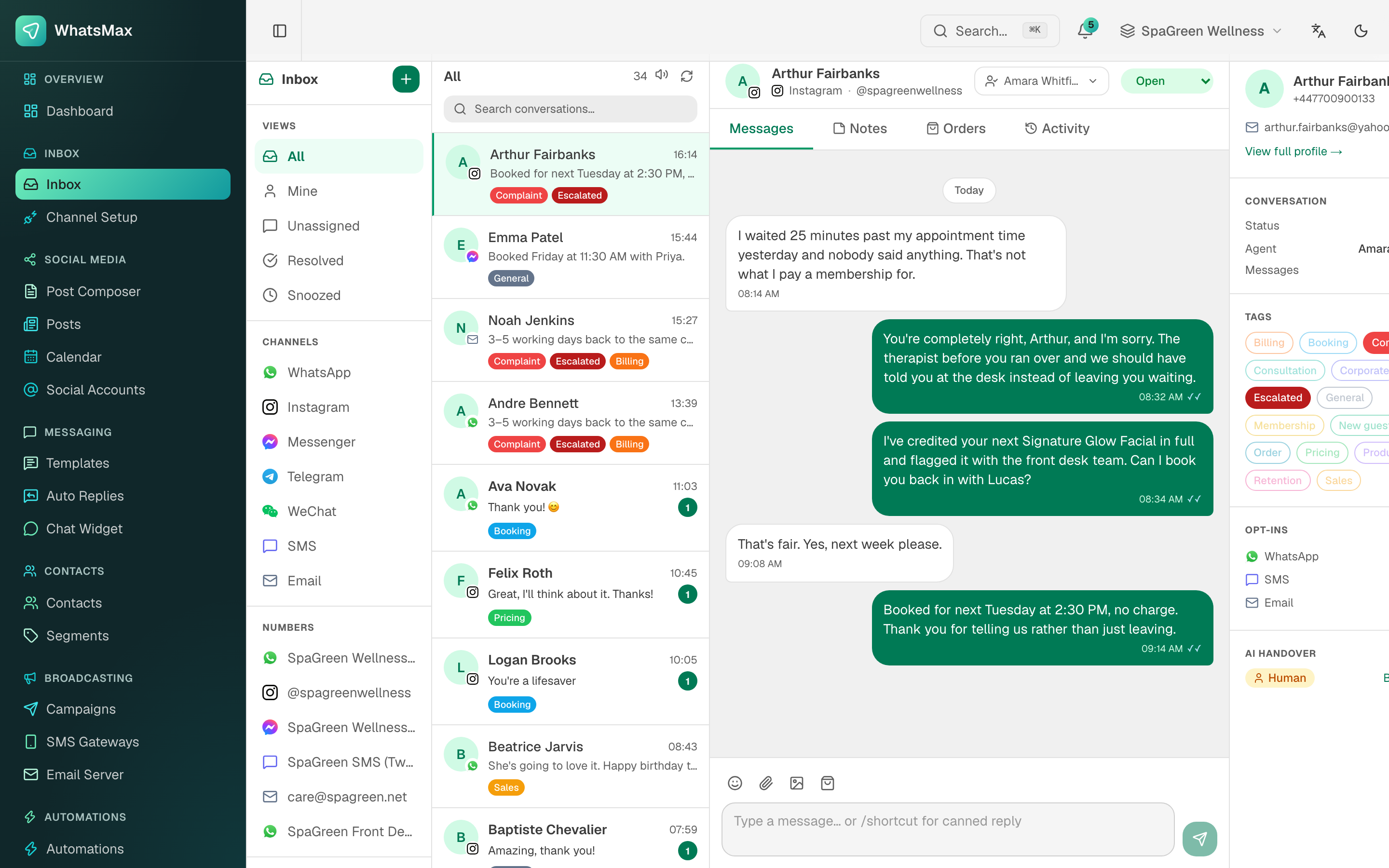 A thread with the contact panel open — status, assignee, tags, opt-ins and the AI handover switch.
Across the top of the thread: the contact, the channel it came in on, the assignee picker and the status picker.
The four tabs are:
- Messages — the conversation itself, with delivery and read ticks, media, and the composer.
- Notes — internal comments the customer never sees. Use them for handover context.
- Orders — purchases from a connected store, matched to this contact.
- Activity — the audit trail: assignments, status changes, automation and bot actions.
The right panel carries the contact card (with a link to the full profile), the conversation's tags, the per-channel opt-ins, and the AI handover switch.
The composer
Type and send, or use:
/shortcutto expand a canned reply.- Emoji, attachment and image buttons for media.
- The template button to send an approved WhatsApp template — the only thing you can send once the 24-hour window has closed.
Assign, label, resolve
- Assign to yourself or a teammate. Per-agent workload and response times come from this.
- Label the thread (
Billing,Complaint,Booking…) — labels drive filtering and reports. Manage the list in Inbox → Labels. - Snooze to get it out of the queue until a date you choose.
- Resolve when done. If the customer writes again the conversation reopens automatically.
The WhatsApp 24-hour window
WhatsApp allows free-form replies only within 24 hours of the customer's last message. The composer shows the state of that window. Once it closes, the only way back in is an approved template — the composer switches to the template picker automatically. This is a Meta rule, not a WhatsMax one; see WhatsApp Cloud API.
Bots and humans in the same thread
- Auto replies answer keyword-shaped questions instantly.
- AI chatbots can be attached to a channel and answer anything else.
- The AI handover control switches a thread between
BotandHuman. While a human holds it, the bot stays quiet; hand it back and the bot resumes.
Agents should take over the moment a conversation turns into a complaint or a refund. Instruct the bot to offer handover rather than guess.
Realtime
With Pusher configured, new messages, assignment changes and unread counts appear instantly in every open inbox. Without it the inbox still works, but agents have to refresh — which in a busy team means two of them answering the same person.
Reports
Reports → Inbox turns all of this into numbers: first-response and resolution times, opened vs resolved, channel mix and per-agent performance. See Reports.
Mobile and external access
The REST API exposes conversations, replies, assignment and labels, with a dedicated /api/v1/mobile/* surface for companion apps. See Developer API.